Showing posts with label windows 7. Show all posts

Saturday, October 31, 2015

WINDOWS 10 UPDATE " THRESHOLD 2" OUT IN NOVEMBER


With the release of Windows 10  in july, it is already the hottest product in market with more then 10 million users operating it, in its first quater .better then any of their previous launches ,windows 7,windows 8 ,windows xp. Since the launch of the new product microsoft has already released no of updates regarding the bugs and issues . But for now they have decided for its major update which was earlier planned to be launched in october but for some reasons this update is postponed to early  november.

This delay in release of "threshold 2" will certainly benefit the microsoft as they will be given a bit more time to develop their new update which hopefully will result in a better and complete setup for its users. From our reports we have heard windows insiders have been using threshold 2 builds for a week or two and have made the necessary changes in it,and have not reported any big changes or additions.

The main reason for this update is to address the issues affecting users of operating system. Main problems experienced by users were the use of touchpad, issues accessing and utilizing the start menu and page freezes, screen flickering and flashing, lagging issues. Some other users were stumped when their systems were unable to upgrade at all and was displaying the error messages instead. Moreover reports have said once released , the update is expected to include additional extensions for microsoft,s new browser that will replace internet explorer, a new universal desktop messaging app and other improvements.

Lastly speaking about the name of the update has not promoted very much so they might replace the name" Threshold 2 " to" windows 10 november update" or might just launch as the windows 10 update we never know , from our experts we came to know that Threshold 2 isn’t a big update compared to "Redstone" which is Microsoft’s next major update for Windows 10 which might b coming in 2016  that will pack a whole load of new features for consumers and enterprises.

Sunday, March 3, 2013

How To Activate God Mode In Windows : Work Like A Pro

God Mode, Yes you read it right.Windows have a God Mode which is not displayed by default.God Mode is an ultimate feature of Windows that allows you to easily find and do things, that exists on windows and you might not know.
The name God Mode suits it well as it has complete list of settings at one place. By activating GodMode you can access all control panel options in one folder.

How to Enable god mode in Windows 7 -

Steps to Activate God Mode and control your system like a pro: 
Create a new folder on the desktop - Name the folder as GodMode.{ED7BA470-8E54-465E-825C-99712043E01C} -


You will now see a new folder similar to the folder shown in screenshot.


Open it to see all the settings listed. Basically God Mode is divided into following categories.

1. Action Center In God Mode | Windows :

 Action Center In God Mode inr Windows


2. Administrative Tools in God Mode | Windows  :


3.AutoPlay in God Mode | Windows :

AutoPlay in God Mode | Windows :


4. Backup And Restore in God Mode | Windows :

Backup And Restore in God Mode | Windows :

5. Color Management In God Mode | Windows


6.   Credential Manager In God Mode Windows :


7. Date And Time In Windows God Mode :


  8. Default Programs In God  Mode :


9. Desktop Gadgets In God Mode :


10. Device Manager In Windows God Mode :


11.Devices And Printers In windows God Mode :


With the help of God mode you only get to discover settings you never knew existed.Its easy way to explore all the tweaks you can perform with your Windows.  Also, the folder doesn't have to be named GodMode for it to work, you can name it whatever you like.Sotry this whole new way of exploring your system settings.I assume you might not know anything about  God mode but i assume you will soon be using Windows God Mode as it will be very hanndy having all the settings at one place.

If you found this trick helpful just spare a moment and share this article. Thanks we love our readers.Don't hesitate to ask anything about the technical stuff we are here to help you .

You May Like : 

Sunday, January 6, 2013

Top 10 Antivirus Software For 2013

There are lots of antivirus software available in the market and its not a easy job to select the best one among them.A good antivirus contains a good design,interface,features and functions.In this post you will see top 10 Antivirus software for 2013 which will provide you better security for your data and information.


TOP 10 ANTIVIRUS SOFTWARE 2013


1 Kaspersky Antivirus 2013
Top 10 Antivirus Software For 2013


Kaspersky protection comes with some of the advanced security technology involving exploit prevention engine as part of the security suit.It also contains safe money banking protection tool.


2 Bitdefender Antivirus 2013
Top 10 Antivirus Software For 2013

In addition to powerful antivirus protection,Bitdefender's features list includes antiphising,parental controls,firewall,secure online storage,ID security,USB device security.


3 Norton Antivirus 2013
Top 10 Antivirus Software For 2013

Norton antivirus is the entry level product with norton internet security occupying the middle rung.Little slow to respond Norton efforts to protect you on social networks,protection against scams and other social attacks,and a bolstered firewall.


4 AVG Antivirus 2013
Top 10 Antivirus Software For 2013

AVG antivirus 2013 has a new optimized interface for windows 8 which makes it easier to use.Installation process of AVG antivirus is little lengthy but it comes with some of the great new features.


5 F-secure Antivirus 2013
Top 10 Antivirus Software For 2013

F-Secure Antivirus 2013 comes with the improvements and provide the top rated security.This suit has a fast and a pain free installation.


6 BullGaurd Antivirus 2013
Top 10 Antivirus Software For 2013

BullGaurd Antivirus 2013 based on multiple defence layers to keep you safe from all online threats,viruses,spams etc.This version comes with enhancements and bug fixes.


7 VIPRE Antivirus 2013
Top 10 Antivirus Software For 2013

Two main features VIPRE Antivirus contains is easy install and Rapid Scan.This antivirus works perfectly without slowing down your computer and also protect you from email viruses.


8 G-Data Antivirus 2013
Top 10 Antivirus Software For 2013

G-Data Antivirus 2013 uses a intelligent combination of two antivirus scan engines,cloud technology and system monitoring.This antivirus offers the best instant protection against all viruses,malware and other threats.


9  Avast Pro Antivirus 2013
Top 10 Antivirus Software For 2013

Avast Pro Antivirus is based on certified antivirus engine and is used by more than 150 million people.Two great features of Avast is hybrid update tech and File reputation analysis which makes it more secure.


10 Webroot Antivirus 2013 
Top 10 Antivirus Software For 2013

Webroot Antivirus uses radically new cloud based technology to internet security and protects you against threats.It will scan your system at a very high speed as compared to other antiviruses.


Sunday, July 22, 2012

20 Best Free Windows 7 Apps You Must Have : 2012

Thinking what programs to install on your windows to get the performance ? No more thinking  required now as we have  managed to list 20 windows 7 applications you must have .These apps should be the first you must install on your new windows installation as these are must have apps for windows 7 .We believe these options are must have software for Windows 7 to complete all your day-to-day computing needs and you should download right away after installing your Windows 7. Good Thing is that these all apps are free .

20 Windows 7 Apps You Must Have : Free

20 Windows 7 Freeware Apps You Must Have:


1 Microsoft Security Essentials Free Download :
20 Windows 7 Apps You Must Have : Free

The first application you must download is a good anti-virus/spyware utility. As antivirus is a must on Windows 7, Microsoft security essential is a freeware.  MSE is excellent antivirus software as it uses less resources and is efficient in handling viruses .This is only available for original Windows 7. You can also see all time best antivirus software.


2 Google Chrome Free Download :


20 Windows 7 Apps You Must Have : Free
Google's free Chrome browser is one of the faster browsers on the Web. Tech Flashed recommend chrome as it is faster and more secure then any other browser.


3 Adobe Flash Player Free Download :

20 Windows 7 Apps You Must Have : Free
Adobe Flash Player is the most must have Software for windows 7 It enables you to see video or many other types of animation on the Web . it's something you Must have , Flash should be one of your first software to download and install.


4 VLC Media Player Free Download :
20 Windows 7 Apps You Must Have : Free

VLC Media Player is free to download, open-source multi-platform media player, framework and server, featuring a vast array of free special features.VLC Media player may not focus on looks but it lay emphasis on quality and other media player featured  and it succeeds by being able to play virtually any video and audio format with impressive quality.


5 Skype Free Download :
20 Windows 7 Apps You Must Have : Free

Skype is the Most popular application for video chat and voice calls over the Internet. Skype allows users to call any other Skype user for free . With Skype you can do instant messaging and screen sharing and some other cool stuffs . Skype also have some paid services like calling a phone .


20 Windows 7 Apps You Must Have : Free

6 Digsby Free Download :

Digsby is my personal choice  for instant messaging .Instead of keeping 10 different IM applications use digsby . Digsby allows you to gather all of your online IM into a single application, allowing you to easily manage your Facebook, Gmail, AIM accounts and more.


7 Internet Download Manager Free Download :


20 Windows 7 Apps You Must Have : Free
Internet Download Manager is used to download any thing from any site. It shows on-screen download links, which makes your Internet surfing easy and fast. You can make your downloading file Pause and Resume. You can also add a new URL to download manually , what else could you want from a download manager . IDM is excellent and is very light .


8 µTorrent FREE DOWNLOAD–

20 Windows 7 Apps You Must Have : Free
If you are looking for torrent client which occupies less space but gives optimum performance than answer is U Torrent which occupies only 300kb space of your system memory and gives you chance to enjoy the advance piece of torrent.


20 Windows 7 Apps You Must Have : Free9 Adobe Reader Free Download:

There is no doubt that Adobe Reader occupies lot of memory space than other similar software’s however it is better to stick with original creaters of the PDF format.


10 Picasa Free Download : 


Picasa is the excellent photo viewer  to preview pictures , Picasa is a best photo viewer application Created by Google, Picasa gathers and organises all your photos to make them easily accessible. Adjusting and fixing your photos, posting them online, in Picasa you can edit, crop and make collage of our images ,also videos can be mixed and and we can take pics of playing videos



20 Windows 7 Apps You Must Have : Free11 iTunes Free Download: 


 iTunes ia a must app for apple owners without i tunes connecting apple products with PC or laptop is not possible   iTunes software is a digital hub providing a gateway to music, movies, television shows, mobile applications and  more. It's a must-have for anyone (especially iPhone and iPod owners)  



20 Windows 7 Apps You Must Have : Free

12  Notepad ++ Free Download :


  Notepad is a free app that supports different programming languages like C,C++,Html etc and more than 50 languages supported . The program also supports auto completion for a subset of the API of some programming languages , Notepad is a source code editer for windows , Notepad ++  is must application for engineers.


20 Windows 7 Apps You Must Have : Free13 Gtalk Free Download:


Gtalk is a free and best app for instant messaging service that provides both text and voice communication. Google talk is integrated into G mail , users can send instant messages to other Gmail users .


20 Windows 7 Apps You Must Have : Free

14 CCleaner Free Download  :


 Windows 7 will tend to run slowly on lower end computers. One way to speed up a slow computer is to clear up unnecessary junk files that pile up in your hard drive, and CCleaner does just that. And with an added uninstalling feature that removes annoying programs that refuse to leave your computer, CCleaner is strongly recommended.You can also see top 5 free registry cleaners software for windows . 


20 Windows 7 Apps You Must Have : Free


15. Photo Scape Free Download : 


 For low system configuration where one can’t run Photoshop then here is an alternative for you. Photo Scape is a great free photo editing software application which supports RAW, as well as all other major image formats from JPEG and PNG to animated GIF’s. 


16.Recuva Free Download : 
20 Windows 7 Apps You Must Have : Free


 Recuva is an important free ware software that recovers files that have been accidentally deleted from the Recycle Bin, MP3 Players and memory cards .You can easily recover your most important data which has been deleted accidentally .


17. Eraser Free Download :
20 Windows 7 Apps You Must Have : Free


Almost all users store some sort of confidential information such as passwords or bank statements on their  windows system.You must know that Files deleted from the recycle bin are not necessarily lost forever, and it could be a disaster if someone managed to retrieve that important information. Eraser erases by overwriting the selected file several times in 'carefully selected patterns.


18.Ditto Free Download

Ditto is an open source extension to the standard Windows clipboard. It saves each item placed on the clipboard allowing you access to any of those items at a later time.


19. CD Burner Free Download :
20 Windows 7 Apps You Must Have : Free


CDBurnerXP is a free application to burn CDs and DVDs, including Blu-Ray and HD-DVDs. It also includes the feature to burn and create ISOs and much more . It is a strong candidate in must have of windows 7 apps .


20 : Gimp Free Download :

One Of the renowned general purpose image editor . But i can not be considered as a replacement for Photoshop.


We are leaving here as these are the 20 best windows 7 apps you must have . These apps are very essential and can help you at the time of emergencies . If you want add an app to this list please post it as a comment we would definitely like to increase our list .

You May Also Like :
*  20 + All Time Best Free Video Editing Software for Windows

*  Top 15 Best Free Backup Software

*  All Time Best Free Full version Antivirus Download

*  Top 5 Free Proxy Softwares Download

Thursday, July 5, 2012

How To Install Whatsapp Messenger on Windows Pc

How To Install Whatsapp Messenger on Your Pc and Laptop Whatsapp Messenger is a very popular and free app for android , blackberry , nokia s60 and paid app for ios . instead of basic Messaging users can send each other unlimited images , recordings ,songs and videus also ,If u don't have an android phone or apple and you want to chat with your friends who are using whatsapp , Bluestacks is the solution for you , now u can install whatsapp on your pc and laptops very easily with the help of blue stacks app player.Bluestacks is available for windows as well as for mac .


Follow These Steps To Install Whatsapp On Your Windows 
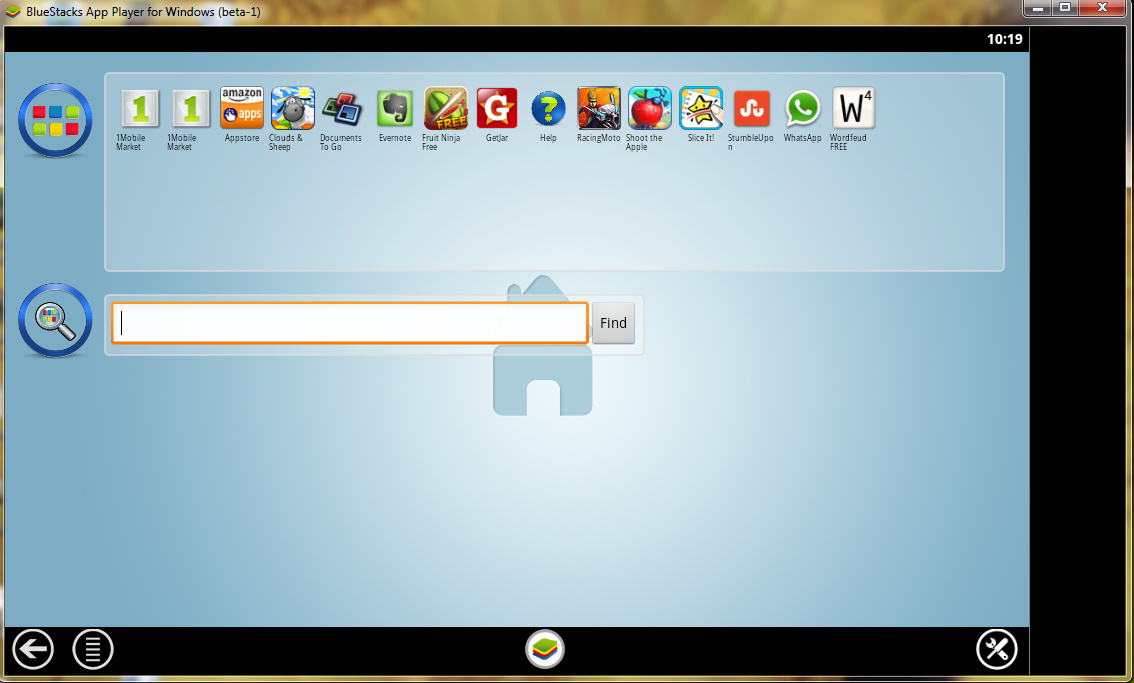
Step 1:  After Downloading the Blue Stacks App Player , install the Blue Stacks App Player on your pc and after installing , Blue Stacks will open like below 


How To Install Whatsapp Messenger on Your Pc and Laptop


Step 2:  Search the Whatsapp Messenger in the Search Bar


How To Install Whatsapp Messenger on Your Pc and Laptop


Step 3: Click on the Whatsapp Messenger and Downloading will Start .


How To Install Whatsapp Messenger on Your Pc and Laptop


Whatsapp opens on the BlueStacks app player , After Verifying your Phone no you can start  start using Whatsapp Messenger


How To Install Whatsapp Messenger on Your Pc and Laptop


Blue Stacks app player is available  for Windows and you can also install  all other Apps of Android on windows and mac .

Once you have installed and register whatsapp on your windows /mac system now you can send and receive messages on your system .

You can easily download  Blue Stacks App Player from this link