Showing posts with label android. Show all posts

Friday, November 6, 2015

Windows Application In 10 Minute

Windows store is famous for its own applications  and company  always gives some innovation to its App developers so that the users must get attracted towards the app store . Microsoft has invented two tools which helps in running IOS and ANDROID Applications.


The Microsoft had updated their App Studio which they have given the chance to the users that without installing or giving any coding or visual studio they can make new applications with the help of this tools any application can get ready in just 10 minutes .They can't make together visually stunning and no code tools but they will attract their new users towards them and it can definitely churn out a functional application in short order. Though the new projects have a choice of few basic templates,most of them having a good amount  to simply display a webpage within an app to experience various sections such as API curations from services like you tube,bing,Facebook,twitter.


The most important feature is that with your application you can make a new icon with the help of theme and icon editors .Windows 10 has given an option of side downloading too . Apart from this hero image editor is also available this app will support the initial windows 10 too. But this Windows App studio wont help you to create an proper application or game that you can built a business around ,but yeah it will definitely help you in making the websites , business ,branding etc


Tuesday, March 12, 2013

How To Broadcast a Message In WhatsApp

WhatsApp is the most used  Smartphone app being used these days. Whatsapp lets you connect with your Phone's contact list on the go. Whatsapp can be the considered as the worlds largest social network.Yes whatsapp is giving competition to Facebook.
Many Whatsapp users might not be aware of broadcasting feature of whatsapp. Yes , Using whatsapp messenger,one can send a broadcast message to at-most 25 friends at a time.

How To Broadcast a Message In WhatsApp :

Broadcasting a message is very simple and you just have to follow these simple steps.

1. Open Whatspp on your phone, select menu. Then select "New Broadcast"
How To Broadcast a Message In WhatsApp


2. Now type the names of your friend you want to send a broadcast message. You can select up-to 25 friends for one broadcast message in whatsapp. Once you have selected your contact you have to select create and you will be taken to next screen where you can type your message that you want to broadcast.
How To Broadcast a Message In WhatsApp

3.Once you select create , Now you can write a message to be broadcast.And then click send.
How To Broadcast a Message In WhatsApp

Thats it .If you have completed the above steps that means you have succesfully broadcasted the message on whatsapp.

If you have any query regarding whatsapp or any other technical stuff please feel free to ask from our contact us page or you can post a comment

You may also Like : 

* Sign in To Google Mobile Or Desktop Apps Even if Two Step Verification is ON | How To


Tuesday, January 29, 2013

Sign in To Google Mobile Or Desktop Apps Even if Two Step Verification is ON | How To

How Does Two Step Verification Works ?
Google Users who have enabled 2-step verification for making their account secure from unauthorized use need to periodically enter a special verification code, in addition to their username and password, to sign in to Google Apps. When signing in from a web browser, User is prompted to enter a verification code(Received on phone) after entering your password.
One of my Friend activated Gmail two step verification and was not able to sign-in on his Android device.I think many of you might be facing the same problem on respective Android and iPhone devices.The Error Message looks like the screenshot below.

Sign in To Google Mobile Or Desktop Apps Even if Two Step Verification is ON | How To

The problem is mobile and desktop apps aren't configured to accept a verification code. In such cases, user needs to sign in by entering another type of code which is an alternate to two step verification code and is called as Application Specific Password in place of their Google Account password.Yes , You have to enter this Application Specific Password in place of your Google Account Password.

Which applications typically require an application-specific password?

Any desktop or mobile application that doesn't prompt your users to enter a 2-step verification code at least once after they enroll in 2-step verification. 
Common applications and devices that require an application-specific password include:

  • Gmail and Google Calendar on Android-based phones
  • ActiveSync for Windows Mobile and iPhone
  • IMAP clients such as Thunderbird
  • Installed chat clients such as Google Talk and Adium
  • Syncing with Picasa, 3D Warehouse, and Sketchup
  • Google Toolbar (for certain functionality)

How To Get Application Specific Password For Google App ?

Just Follow the simple steps and you are done :

Sign in to your Gmail Account and Go to https://www.google.com/accounts .Then click on Security  and scroll down to bottom of page till you reach Connected applications and sites And click Manage access as shown in screenshot below.


As you click on Manage Access you will be prompted to enter your password , this is done for extra security. Enter the password and sign in again and you are just two steps away from getting Application Specific Password for your Google App.

Enter the name of Application you wish to have Application Specific Password for you want.

Application Specific Password For Gmail On Android

You can write Gmail on my iPhone if you want to access Gmail  App on your iPhone.(This Name is only for your convenience you can write anything you want).After entering the name just click on  Generate Password.
Application Specific Password For Google App


Note : You have to enter this code in place of In your Google Apps Password field.

Now you can access your Google App on your Android or iPhone.On your Android phone you will get a message as shown in the screenshot below.

Sign in To Google Mobile Or Desktop Apps Even if Two Step Verification is ON | How To
Google Account Linked to this phone (Android)

You have successfully configured your Google App for your device . Now you can your Google App on your Android or iOS device . You can use the same procedure for all device which can run Google Apps be that be Android, iPhone or iPad etc.If you still face any problem in configuring your Account do ask in comments.


If you found this Tutorial helpful just spare a moment and share this article. Thanks we love our readers.Don't hesitate to ask anything about the technical stuff we are here to help you .

You May Also Like : 


Sunday, January 6, 2013

Facebook Pages Manager App now available on World's Famous Mobile OS Android

Facebook continues its mobile focus by launching Facebook Pages Manager App for Android users, Letting Android users to enjoy the feature which was previously available only to i OS users.Facebook now has 3 apps on Google Play which includes Facebook ,Facebook Messenger and the newest addition Facebook Pages Manager.

Facebook Pages Manager for Android lets you manage Facebook pages you admin on the go.Helps Facebook Page admins connect with their audience and keep up with activity on multiple Pages.The App is only available in limited  region only and requires Android Version 2.2 or Up .

Facebook Pages Manager for Android
Facebook Pages Manager for Android 
Facebook Pages Manager App for android from Facebook lets you manage all the pages you Admin and 
• Post new updates and photos and respond to comments as your Pages
•View and reply to private messages sent to your Page
• Get notifications about new activity on your Pages right away
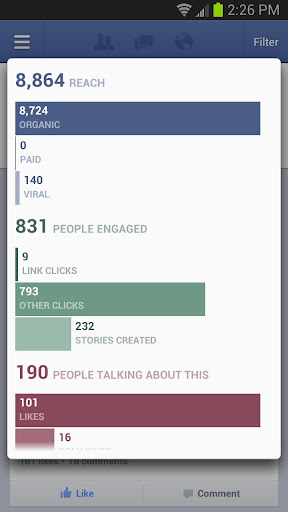
• View your latest Pages Insights

View your Facebook Pages Insights
To view the insights of your Facebook page on your android device just Tap the Likes box to see insights about your Page. In Pages Manager you can view: Total likes People talking about your Page Weekly total reach.

Download Facebook Pages Manager For Android 


Monday, December 17, 2012

Top 10 Phones of 2012 || Best Smartphones of 2012

Choosing a best mobile phone is becoming difficult as mobile phones are evolving fast.Valuable mobile phones contains advanced specifications , long durable battery,attractive design and reasonable price.

Android market is mainly dominated by Samsung  where as Nokia manages to sneak in with windows phone by ditching their old partner Symbian.There are lots of mobile phones released in 2012 but here's the list of some of the best phones of 2012.

LIST OF TOP 10 MOBILE PHONES OF 2012


1  Samsung galaxy S3
top phones of 2012


Operating System           Android OS V4.0.4

Camera                                  8 MP

Secondary Camera        1.9 MP  


2  Apple iPhone 5
top phones of 2012


Operating System          IOS 6.0.1

Camera                                  8 MP

Secondary Camera        1.2 MP  

Internal Memory            16/32/64 GB


Internal Memory            16/32/64 GB


3  Nokia Lumia 900
top phones of 2012


Operating System     Windows 7.5 Mango

Camera                                  8 MP

Secondary Camera        1.3 MP  

Internal Memory            16 GB


4   Samsung Galaxy Note II  
top phones of 2012


Operating System            Android OS V4.1.1

Camera                                  8 MP

Secondary Camera        1.9 MP  

Internal Memory            16/32/64 GB


5  Nokia Lumia 800
top phones of 2012


Operating System        Windows 7.5

Camera                                  8 MP

Secondary Camera        No  

Internal Memory            16 GB


6  Motorola Droid Razr 
top phones of 2012


Operating System            Android OS V4.0.4

Camera                                  8 MP

Secondary Camera        1.3 MP  

Internal Memory            16 GB


7   HTC Windows Phone 8X 
top phones of 2012


Operating System            Windows 8

Camera                                  8 MP

Secondary Camera        2.1 MP  

Internal Memory            16 GB


8   Sony Xperia S
top phones of 2012


Operating System            Android OS V2.3

Camera                                  12 MP

Secondary Camera        1.3 MP  

Internal Memory            32 GB


9  Google Nexus 4 
top phones of 2012


Operating System            Android OS 4.2

Camera                                  8 MP

Secondary Camera        1.3 MP  

Internal Memory            8/16 GB


10  Huawei Ascend P1 S 
top phones of 2012


Operating System            Android OS V4.0

Camera                                  8 MP

Secondary Camera        1.3 MP  

Internal Memory            Card slot 32 GB


please note
(Some of the above android phones are up-gradable to  higher versions of their operating systems.)

Sunday, November 4, 2012

Android vs iOS Development - Why App Developers Choose iOS Over Android

The number of Smartphone users around the world is increasing at a rapid pace and in the coming years the numbers are expected to rise at a rocket pace.Among all the smartphone makers its Android vs iOS world. Since the Battleground is between the two giants that are having the larger part of market share and will continue to do so because of their popularity and no doubt because of quality and range of features Apple iOS and Android OS provides to the user.
Why Developers Choose Apple iOS over Android
Just because of rise in smartphone users there is an equal increase in the number of apps and app developers for both the platforms. The app Store and Google play store are having almost the same numbers of apps  i.e around 700k approximately. Yes developers today have many mobile platforms to choose from but they would most probably select one of the promising OS today i.e Android or Apple.

The main reasons why developers choose iOS over Android are:

1. Developers find more profit in developing an iOS app than in Android app.

2.iOS apps takes less time and money as compared to Android.

3. Indeed Google Play Store is filled with apps but the question is of quality , apps in iOS App Store have much more higher quality than of google play store.

4. Apple iOS users have higher rate of buying a new app .

5.Yes , Android is in trend today and rising at a rocket pace but still there is a fragmentation issue , Top android smartphones share only a small fragment of market share ,Moreover there are many android version running simultaneously on various android devices.

Developers are choosing iOS over Android because of the above reasons, Android has given a strong competition to Apple iOS in a very short span , Android has hit hard Nokia , blackberry and other competitors in the market and has made a good reputation , because of open source platform Android has the potentials to beat Apple iOS in every field. Some of the android features are superb and can be integrated in Apple iOS but still Developers are more interested in developing an app for apple ios first than for android os.These are the 5 main reasons why developers are choosing ios over android ,if you find something more valuable in support or against to the above opinion please don't forget to post it as a comment.

You May like :

*  Best Android Features That Can Be Integrated In Apple iOS

* Top 10 Android Widgets You Must Have


Tuesday, August 21, 2012

Best Android Features That Can Be Integrated In Apple iOS

Apple is known for its innovation but there are numerous things where we can say Android is ahead of Apple and perhaps it wouldn't be wrong to assume that in the near future Apple may learn some things from Android.Android 4.1 is the fastest and smoothest version of Android yet with improvements throughout the platform and they have added interactive features for users and developers. But beware apple is not new in the business - Apple could bounce back with iOS 6 and has the potential to hit Android hard .We expect apple to integrate these android feature to iOS as they are attractive and useful - This is only our assumption.So here are the 6 Android features which we wish apple should add to iOS .
Best Android Features That Can Be Integrated In Apple iOS

6 Android Features That Might Be integrated In Apple iOs : 

1. Smart Updates : 
With the intelligent smart updates for Android apps,The app with an update doesn't need a full lenghth download instead the updated part needs to be downloaded. This feature will help the android users not only to save internet bandwidth but also the battery - they might have extended battery lifetime .

2. Notifications : 
Android jelly beans the latest version has come up with an enhanced and highly customisable notifications and smarter keyboard.It includes a call back button along with missed calls and Users can now share photos or screenshots right from the notification bar.

3. Android Pattern Unlock : 
Android pattern unlock is and exciting feature which looks attractive and smart. Its an innovative and interactive way to unlock a device .

4. Keyboard : 
Yes , Android has shifted to voice but the keyboard in android jelly beans can be mentioned among the best featured of the smartphone.New Jelly Bean keyboard enables the user to typing a word or two, and then based on what you’ve said, the software makes a few intelligent guesses on what your next word will be and offers them up as options just before you type the next word .

5. Google Now : 
Google Now is an amazing service that takes everything the smartphone knows about the user and respond to user's day to day queries just at the right time and all these things are done automatically .Google now comes up with cards  which know what your day looks like.

6. Voice Actions Are Available Offline :
 Google has shrunk the size of voice recognition so that the entire thing is offline. Now if you want to send a text message or type using your voice, you can do it right from the keyboard, no internet connection necessary.

These are some of the Android features that we wish we could use in our iOS . 

You May Also Like :

*  Top 10 Android Widgets You Must Have

* Top 5 Video Streaming Apps For Android

* How To Use Your Android Phone As a Wireless Modem

* Switching From iPhone To Android : How To

* 10 Reasons to go For Android Based Cell Phones

Monday, July 9, 2012

Google Releases Android 4.1 Source Code

Google releases Android 4.1 source codeAndroid 4.1, Jelly Bean, is one the fastest and smoothest version of Android yet. Jelly Bean improves on the simplicity and beauty of Android, and introduces a new Google search experience on Android.
A good news for developers is that Android has released the source code for Android 4.1. The name of the branch is jb-dev as per one of the Google Group .

The blog post says "We're releasing Android 4.1 in AOSP today"
The source code for the latest version of Google's mobile operating system i.e is Android 4.1 was released today as part of the Android Open Source Project( AOSP).
Google releases Android 4.1 source code
Screenshot Taken From Google Group

Android 4.1 is the best android version so far . Android has always got little bit faster in each new version .Android 4.1 provides its user with Excellent overall performance, Search and Notification updates are huge improvements , Offline voice dictation and maps and plenty of minor updates throughout.

Top 10 Android Widgets You Must Have

Widgets are valuable because it gives your home screen a better look and a facility to access the application directly from your home screen.One of the advantage of using widgets is that you can also access the applications very quickly via widgets.Here's the top 10 widgets you might find useful for your android device.


Top 10 Widgets For Android 

1  Watch ESPN 
Top 10 Android Widgets You Must Have
Get  updates from sports instantly get live scores and ESPN shows on your android mobile or tablet.You can get live streaming of ESPN.

2  Google Drive
Top 10 Android Widgets You Must Have
Google Drive for android is very helpful specially for students.You can upload files instantly on Google drive and can share them with your friends.With Google drive you can access all your documents at just one place.

3  Twitter
Top 10 Android Widgets You Must Have
Twitter is getting popular day by day.Now gets all information of your twitter profile by just one click.This widget will provide all the facilities like real time search,tweet,retweet,follow and other options.

4  Dictionary
Top 10 Android Widgets You Must Have
Dictionary is very important learning tool.We need dictionary during studies and sometimes at other situations so it is a nice widget to access the dictionary directly from the home screen.

5  3G Watch Dog
Top 10 Android Widgets You Must Have
3G watch dog is a application to monitor the mobile internet data usage.It also notifies you with the green,orange and red notify bar.

6  The Weather Channel 
Top 10 Android Widgets You Must Have
Get the accurate weather updates on your screen with a single click.It also allows you to plan your day week or a month according to the weather.

7  Tiny Flash Light 
Top 10 Android Widgets You Must Have
This is a good application to use the flash light of the phone as a torch.There are situations when we need light very quickly and this is a very easy way to use light directly from the homescreen.

8  Cam Scanner 
Top 10 Android Widgets You Must Have
CamScanner helps you to turn your phone into a scanner.With the help of this widget you can scan any document or a file and then you can share it on internet.CamScanner also provide many other features like enhancing the picture quality etc.

9  Google Finance 
Top 10 Android Widgets You Must Have
If you are related to stock market then this widget is very important to you.This is a good way to get the real time stock updates directly on your homescreen.This is a good way to get the latest updates and news about the stock market.

10  Trip it
Top 10 Android Widgets You Must Have
If you usually travels a lot then this widget will help you to organize your trips in a better way.Save all information about your trip like airline tickets,Hotel room details and etc.

Sunday, July 1, 2012

Top 5 Free Multiplayer Games For Android

Playing multiplayer games is fun and more Entertaining.Most of the multiplayer games are not available for free,You have to pay some money to download these games to your devices.Here we are telling you about the Top 5 most popular free multiplayer games available for Android.

TOP 5 FREE MULTIPLAYER GAMES FOR ANDROID 


1  BATTLE FOR MARS 
Top 5 Free Multiplayer Games For Android
Battle for mars is a strategy based game in which you have to use soldiers,robots and spaceships to destroy the alien races.You will be given maps to find the way to your destiny and you have to fight with the enemies in between.


2  RAGING THUNDER 2 
Top 5 Free Multiplayer Games For Android
Car racing games have always been entertaining and popular.Raging thunder 2 is loaded with stunning graphics.There is a variety of racing circuits you will find in this game.


3  ANT SMASHER 
Top 5 Free Multiplayer Games For Android
In this game you are competing with your fellow players in smashing the ants with your fingers.This game is highly entertaining for kids and the reviews have shown that this game is very addictive.


4  HOMERUN BATTLE 3D
Top 5 Free Multiplayer Games For Android
If you are baseball fan then you will love this game because it gives a unique gaming experience.You can play matches with the players all around the world.This game is in 3D which makes it more special and popular.


5  WORDFEUD
Top 5 Free Multiplayer Games For Android
If you like puzzle games then you will love this game for sure.This is a word puzzle game in which you can challenge your opponents for the 30 different puzzles.You can also chat with your opponents during the game.

Friday, June 29, 2012

Top 5 Video Streaming Apps For Android

Android is one of the most famous Choice for user all around the world now . Android has all the necessary features and apps one wants .Now you will not get bored while waiting at the airport or anywhere else as you can watch and stream your favorite videos on your android  with the help of  (3G,4G) connections.We have selected the top 5 Video Streaming Apps for you.


TOP 5 VIDEO STREAMING APPS FOR ANDROID 


1  HBO GO
Top 5 Video Streaming Apps For Android


This streaming service is from HBO.There is a large collection of free HBO shows,movies,sports and comedy.You can subscribe yourself to your favorite TV shows like "sex and the city" and others.
DOWNLOAD HBO GO HERE 

2  MAX GO
Top 5 Video Streaming Apps For Android


This streaming service is from cinemax.There is large collection of hit Hollywood movies.You can also create a watch list for your favorite TV shows.Max Go is available in the US and certain US territories.
DOWNLOAD MAX GO HERE

3  TED
Top 5 Video Streaming Apps For Android


This Application actually contains the videos about the most fascinating peoples of the world taking about technology, Business, music and other topics.This application contains a large collection of talk shows with some other functions like HQ control etc.
DOWNLOAD TED HERE 

4  CRACKLE
Top 5 Video Streaming Apps For Android

Crackle is also a awesome video streaming app for android.There is a huge collection of full length uncut TV shows,you can also watch super hit Hollywood movies.Crackle also provides a feature of HQ streaming.Crackle is only available in US,UK,CANADA and AUSTRALIA.
DOWNLOAD CRACKLE HERE

5  HULU PLUS
Top 5 Video Streaming Apps For Android


Hulu Plus is also a very good video streaming app for android but this application is not entirely free,it requires a monthly subscription of  $7.99.You can also try this application for free for one week.With Hulu Plus you can watch TV shows and Hollywood movies on your computer , android device or on any other devices too.
DOWNLOAD HULU PLUS HERE

Thursday, June 28, 2012

BlueStacks Enables You To Port Android Apps On Mac

BlueStacks have enabled users To use android apps and games on Windows 7  . How to run android apps on mac ? The magic of BlueStacks is now not limited to windows only , Everyone will be glad to know that By using BlueStacks one can port Android apps on Mac also .


BlueStacks Enables You to Port Android apps to Mac

In addition to the Android basics apps , Bluestacks will let users to run several apps from BlueStacks partners such as HandyGames, CreativeMobile, and Pulse. Bluestacks for windows have done wonders as we all have already seen millions of user all around the world are using it .Now Mac user can step forward and take advantage of this wonderful  app . It supports games , music , social apps , news , messages etc .
It has only 17 apps but it is expected that it may come up with more useful android apps which can be run on mac .

BlueStacks Enables You to Port Android apps to Mac


Free Download Bluestacks For Mac 


Monday, June 11, 2012

How To Remove Hidden Data From Pictures Before Sharing To Social Networking Sites

If you regularly share pictures on Facebook, twitter or any other social networking websites then there may be a chance that you are providing additional details with the pictures like location of the picture and etc.There may be some information you don't want to share like the place where you live, work etc.There are some pictures which have a stored information about where the picture has been taken.Then a question arises that how to remove this additional information before sharing pictures to social networking sites But this can be done easily with a PhotoInfoEraser for Android.

Another method by which you can avoid adding location's into the pictures is simply by turning off the geotagging in your Android phone's camera settings.But if you already have  pictures with location information then you can easily share them with  by deleting the information by PhotoInfoEraser.


How To Remove hidden data from pictures before sharing them to social networking sites

You can delete the metadata with a single tap option on the screen and you can directly share your picture from this application to Facebook twitter or google +.