Showing posts with label facebook. Show all posts

Monday, March 11, 2013

Now You Can Send Middle Finger Emotion on Facebook Chat

In last post we discussed how to activate Facebook News Feeds .Yet another Facebook post for you guys . Yes , now you can send Middle Finger emotion to your Facebook friends via Facebook chat and surprise your friends.I am pretty sure the first question your friend will ask after you send middle finger chat emotion to your Facebook friend will be ." Hey , How did you do that " .
Middle Finger Big Chat Code Emotion For Facebook

Also Read : Feel The Power Of Facebook Punch And Surprise Your Friends
               How To activate Facebook Graph Search

Chat Code for Facebook Middle Finger Emotion :

Just copy the whole code below and paste it in the Facebook chat box and Hit Enter.

[[485188408189201]] [[485188424855866]] [[485188418189200]] [[485188414855867]] [[485188421522533]] 
[[485188521522523]] [[485188518189190]] [[485188531522522]] [[485188528189189]] [[485188524855856]] 
[[485188624855846]] [[485188614855847]] [[485188621522513]] [[485188618189180]] [[485188628189179]] 
[[485188721522503]] [[485188718189170]] [[485188724855836]] [[485188728189169]] [[485188731522502]] 
[[485188811522494]] [[485188814855827]] [[485188818189160]] [[485188821522493]] [[485188808189161]]


Please Spare a moment to share this post.


Sunday, March 10, 2013

How To Activate New Facebook News Feed

Facebook has redesigned News Feed feature with some awesome changes and settings .The New Facebook News Feed has variety of fresh features like larger images with vibrant new visuals, multiple feeds as per your interest and same clean look wherever you use Facebook — on mobile, tablet, or web.
How To Activate New Facebook News Feed


Also read : How To activate Facebook Graph Search

How to activate Facebook Feeds
1.Just Login in to Your Facebook Account .

2. Click on this link to activate this Facebook News feed.

3.After reaching the Facebook News Feed landing Page just click on Join Waiting List.

How To Activate New Facebook News Feed

After this you will be shown a Thanks Message just like the screenshot message and you are done . You can close this message.
How To Activate New Facebook News Feed

After a few days you will get a message, You are off the waiting list and ready to start using "Facebook Feeds".

Learn Behind The Design 

Please don't forget to share this post and let your friends know about how to activate Facebook New News Feed.

You May Also Like : 

Tuesday, January 29, 2013

Feel The Power Of Facebook Punch And Surprise Your Friends

We recently discussed how to activate Facebook graph search .Yet another Facebook post for you guys . Yes , now you can punch your friends in Facebook chat and surprise your friends.I am pretty sure the first question after you punched your friend will be ." Hey , How did you do that " .

Also Read : All Time Best Useful Tricks About Google Search
                Now You Can Send Middle Finger Emotion on Facebook Chat

Facebook Punch Chat Code
Facebook Punch 


New Facebook Chat Emotion | Punch Code

Just copy the whole code below and paste it in the Facebook chat box and Hit Enter.

[[488850267812232]][[488850257812233]][[488850271145565]][[488850261145566]][[488850264478899]]
[[488850344478891]][[488850331145559]][[488850334478892]][[488850337812225]][[488850341145558]]

[[488850434478882]][[488850424478883]][[488850427812216]][[488850421145550]][[488850431145549]]
[[488850494478876]][[488850497812209]][[488850501145542]][[488850504478875]][[488850507812208]]
[[488850607812198]][[488850611145531]][[488850601145532]][[488850604478865]][[488850597812199]]

Just After hitting enter you will see that you have punched your friend and he is thinking how did you do that.Enjoy this Amazing Facebook trick .

Don't forget to share this post code otherwise i will punch you . Ha ha please don't worry i am not going to do that that was just a funny side of me perhaps.We like our readers. :-) 

You May Also Like :

Saturday, January 26, 2013

How To Activate Graph Search On FaceBook

Recently Facebook introduced Facebook Graph Search .Facebook Graph search is a new way to navigate your connections and make them more useful. Facebook called it Graph Search, and it has gone live to many users all around the world. Those who Don't have Facebook Graph Search but want it , Just Follow Some simple steps and Activate it .

Must Read : How To Stop Strangers From Irritating You On Facebook

Steps To Activate Facebook Graph Search :

1. Just Login in to Your Facebook Account .

2.Search for " Facebook Graph Search " in the search Bar. And Select Sign Up now OR
Directly click on this link Facebook Graph Search Sign Up.

3.After reaching the Sign Up Page just click on Join Waiting List 


After this you will be shown a Thanks Message just like the screenshot message and you are done . You can close this message.

After a few days you will get a message, You are off the waiting list and ready to start using Facebook Graph Search.That's it , now just click on "Turn On Graph Search" .

How To Activate Graph Search On FaceBook


Please don't forget to share this post and let your friends know about how to activate Facebook graph search as this will help you guys to navigate better.


You May Also Like : 


Thursday, January 17, 2013

Facebook Messenger Activates Free Voice Calling For iPhone Users

Facebook Messenger for iPhone adds free voice calling for US users.Facebook may not have announced a new phone but nevertheless it does have something in store for users in the United States as a new free calling button has appeared in the app.

Also Read : Temple Run 2 Now Available On Apple App Store

Facebook Messenger Activates Free Voice Calling For iPhone Users


Now  iPhone users in the US can make free calls to each other via the Facebook Messenger app using Their Internet.The best thing is you don't  need to update the app in order to use the new feature.Android users still have to wait for the voice calling in Facebook messenger.Voice calling will work similarly to services like Skype and Viber.

Download Facebook Messenger For iPhone

You May Also Like :
* Android vs iOS Development - Why App Developers Choose iOS Over Android
* 10 Reasons to go For Android Based Cell Phones
* Best Android Features That Can Be Integrated In Apple iOS
* 10 Reasons to go For Android Based Cell Phones

Sunday, January 6, 2013

Facebook Pages Manager App now available on World's Famous Mobile OS Android

Facebook continues its mobile focus by launching Facebook Pages Manager App for Android users, Letting Android users to enjoy the feature which was previously available only to i OS users.Facebook now has 3 apps on Google Play which includes Facebook ,Facebook Messenger and the newest addition Facebook Pages Manager.

Facebook Pages Manager for Android lets you manage Facebook pages you admin on the go.Helps Facebook Page admins connect with their audience and keep up with activity on multiple Pages.The App is only available in limited  region only and requires Android Version 2.2 or Up .

Facebook Pages Manager for Android
Facebook Pages Manager for Android 
Facebook Pages Manager App for android from Facebook lets you manage all the pages you Admin and 
• Post new updates and photos and respond to comments as your Pages
•View and reply to private messages sent to your Page
• Get notifications about new activity on your Pages right away
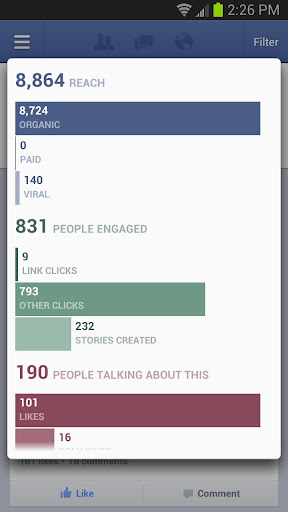
• View your latest Pages Insights

View your Facebook Pages Insights
To view the insights of your Facebook page on your android device just Tap the Likes box to see insights about your Page. In Pages Manager you can view: Total likes People talking about your Page Weekly total reach.

Download Facebook Pages Manager For Android 


Monday, November 5, 2012

How To Stop Strangers From Irritating You On Facebook

With the help of the Facebook we are able to share pictures,Thoughts, memories and lots of other things with our family and friends.But there are also spammers who tries to take advantage of your information and other things.If you are irritated from unwanted messages and friend requests from the unknown people  then there is way by which you can solve this problem by  simple three steps.

HOW TO STOP STRANGERS FROM CONTACTING YOU ON FACEBOOK

1 Log in to your Facebook account and go to privacy settings.
How To Stop Strangers From Irritating You On Facebook


2 Click on edit settings under HOW YOU CONNECT.
How To Stop Strangers From Irritating You On Facebook


3 Now select the settings accordingly that which people can send you messages or friend requests.
How To Stop Strangers From Irritating You On Facebook


Thursday, August 30, 2012

Bing Integrates Facebook Photo Search Feature

Bing added a new Photo feature,now Bing lets you find that special photo posted on Facebook."With more than 300 million photos uploaded to Facebook per day, photo viewing is one of the most popular things people do on Facebook," Ian Lin, Senior Program Manager, Bing Social Team said in a blog post.

This new Feature from makes the browsing more visual.The user who want to use this feature may Visit www.bing.com/friendsphotos and have to login with Facebook and explore the photos posted by your friend on facebook .

On Bing, your Facebook privacy settings are always respected. Your Facebook friends will only be able to see the photos you have made viewable, and you will only see photos your friends have made viewable, and your photos will never be shared with the public.

Wednesday, August 22, 2012

How To Disable Message Read Status In Facebook Messages

Facebook has recently added a new feature which enables a sender of to know that the message has been read by the recipient.Gone are the days when you can simply ignore the Facebook message even after reading it because of the Facebook's new feature that lets the sender to know that message has been read by the recipient - A "Seen" receipt is generated once the message is read .

How To Disable Message Read Status In Facebook Messages

This feature is hated all around the web - I guess none of us liked it. So why not get rid off it as there are numerous occasions where you won't want someone to know if you’ve read their message or not. Chat Undetected lets you disable Facebook Messenger’s read receipt feature, preventing others from seeing if you have viewed a message or not.
How To Disable Message Read Status In Facebook Messages
Chat Undetected Lets You Pretend You Haven’t Read Your Facebook Messages.

Install Chat Undetected


You May Also Like : 
* All Time Best Kickass Facebook Tricks And Tips You Never Knew

Saturday, August 4, 2012

How To Keep Hackers Away From Your Facebook Account

If you are a regular user of Facebook and you usually log in to Facebook account from many devices in a single day then there may be chances that you may leave your Facebook account Active unknowingly.Now there may arises a chance that any stranger can access your Facebook account and can misuse it.We have prepared a list of some important features by which you can prevent your account to be used by the strangers .

1 CREATE A STRONG PASSWORD 
How To Keep Hackers Away From Your Facebook Account

It is very important that you must have a unique password for your Facebook account from other accounts such as Google or yahoo.The best option is choosing a strong password which is a combination of characters,numbers and alphabets.To change your  password go to ACCOUNT SETTINGS>>GENERAL >>PASSWORD EDIT. 

2 ACTIVATE SECURE BROWSING 
How To Keep Hackers Away From Your Facebook Account

Facebook browsing is not safe these days as there are many links and applications which redirects to insecure websites with viruses and other security damaging programs.So this is important that you  should take care of browsing within the Facebook.For this the best option is activating Secure browsing from Facebook.For activating secure browsing go to ACCOUNT SETTINGS >>SECURITY& >>SECURE BROWSING.

3 GENERATE PASSWORD FOR APPS 
How To Keep Hackers Away From Your Facebook Account

When you get logged in there are several applications which can access your account automatically.For preventing this you can set up a password for the the applications like Skype etc.For Activating app password goto ACCOUNTS SETTINGS >>SECURITY>>APP PASSWORDS. 

4 DISCONNECT PREVIOUS ACTIVE SESSIONS
How To Keep Hackers Away From Your Facebook Account

Facebook also provides a facility of disconnecting all previous  sessions from Facebook.This is a unique feature by which you can also know that at what time and from where your account has been accessed .To disconnect the previous active sessions go to ACCOUNT SETTINGS>>SECURITY>>ACTIVE SESSIONS.

5 CONFIRM MOBILE NUMBER 
How To Keep Hackers Away From Your Facebook Account

Confirming mobile number on Facebook helps in many ways.Suppose you have lost your password then the Facebook can send your lost password directly to your phone via sms.You can also get important notifications and messages to your phone.To confirm the mobile number go to ACCOUNT SETTINGS>>MOBILE .

These are some basics things or steps one must know to keep the facebook account safe from hackers .

You May Also Like :

* All Time Best Kickass Facebook Tricks And Tips You Never Knew

*  Top 15 Best Free Backup Software

*  Top Free Full version Antivirus Download

*  Top 5 Free Proxy Software Download

Sunday, July 29, 2012

All Time Best Kickass Facebook Tricks And Tips You Never Knew

Facebook is the biggest social networking site and Millions of users use Facebook for various reason .You all use Facebook on daily basis and assume that you know everything about facebook But there are some facebook tricks and tips you might not know.So here is a list of top Facebook tricks and tips .

Top Facebook Tricks And Tips You Never Knew

Top 10 Facebook Tips And Tricks You Never Knew :


1.  How To Flip Facebook Status 
Top Kickass Facebook Tricks You Never Knew


Now you can surprise your Facebook friends by updating status in a unique upside down way.You can change your status upside down on a website FlipText.org.This trick will definitely attract your friends to your updates.


2  How To Post A Facebook Update Status Via Anything 
Top Kickass Facebook Tricks You Never Knew


Few days back we have told you about the trick in which you can Update Status from mobile by using a  name of the other mobiles.Suppose you are on a PC and you want to Update a Facebook Status from a Blackberry mobile then there is a awesome and a easy way to do that.Not only mobile names you can also use other gadgets and tools to post a status update.know about this trick in our previous article

Post Facebook Status From Any Devices


3  How To Schedule Status Updates 
Top Kickass Facebook Tricks You Never Knew


There is a very simple and a easy way to schedule a Facebook status Update and this is  possible via LaterBro Service.You have to sign in to your Facebook account through  LaterBro then select your country timezone and then update a status after doings clock settings.


4. List Of All Facebook Shortcuts:
Facebook is the biggest social network in the world and one spend lots of time on facebook . you can increase your facebook surfing speed by using some of these simple shortcuts . Now use facebook like a pro by using facebook shortcuts . Enhance your facebook experience .


5. Wired Profile On Facebook :

All Time Best Kickass Facebook Tricks You Never Knew

This is a cool trick one can use to fool your friends This Link "http://facebook.com/profile.php?=73322363" looks like a link of some one's facebook profile instead it will redirect the user on to its own facebook profile .


6 How To Add Dislike Button 
Top Kickass Facebook Tricks You Never Knew


Firefox users can now add Dislike option to there status updates and can make there experience more interesting.For adding the dislike option you only have to install the add on " Facebook Dislike". 


7 How To change Language :


Top Kickass Facebook Tricks You Never Knew


If you want to surprise your friends then you can change a language of your Facebook profile to any other unknown language or if your  mother tongue is different then English and is present in Facebook supported languages then you can select that language as your Facebook profile language to surprise your facebook visitors.You can change a language of your Facebook profile from the footer of the Facebook website.

8  How To Insert Image In Facebook Chat : 
All Time Best Kickass Facebook Tricks You Never Knew

Now you can display a profile picture of your friends in a Facebook chat bar.Only you have to do is to put a small code in the chat bar with a user name of the person whom picture you want to display .Simply put a code [[username]] in the chat bar.


9  How To Post Status Updates In a Blue Color 
All Time Best Kickass Facebook Tricks You Never Knew


Now get more attention of your friends to your post updates by writing them in a blue color.Only you have to do is to include a small code before and after the status as shown in picture above.Put  @@[1:[0:1: before the status and ]] after the status.You can also redirect your friends to their own profile using this trick.

10. How to Hide Status Updates From Certain People :
you can update your status targeting only certain friends or co-workers as per your needs .This feature is just below the "What's On Your Mind " Status bar and just left to the tab Post . Just click on that tab and select custom and you can select and hide your facebook friends as per your needs .
All Time Best Kickass Facebook Tricks You Never Knew


We are leaving you with the top facebook tricks you must know . One can use these facebook tricks to surprise your friends . If you know some more interesting tricks or tips please post it as a comment .

You May Also Like :

*  All Time Best Free Full version Antivirus Download

*  All Time Best Useful Tricks About Google Search : Search Google like A Pro

*  All Time Best Free Video Editing Software for Windows

*  All Time Best Android Widgets You Must Have

*  All Time Best Killer Chrome Extensions To Enhance Your Facebook Experience

*  All Time Best Free Windows 7 Apps You Must Have 

Friday, July 13, 2012

Best Killer Chrome Extensions To Enhance Your Facebook Experience

Facebook is the most popular social networking network in the present world of net.Facebook is a huge addictions for many.Facebook has many amazing features such as games , puzzles, quizzes and much more.You can easily enhance your facebook experience from good to better and better to best.With the help of some amazing Chrome extensions to surf Facebook in a much better way.These Chrome extensions for Facebook provide you numerous features that are not available in facebook and moreover can help you in saving your valuable time.I have selected the best chrome extensions for facebook users. I hope you like these Chrome extensions for Facebook.

Best Chrome Extensions To Enhance Facebook Experience :


1.Chrome Extension For Facebook Like Button :
Best Killer Chrome Extensions To Enhance Your Facebook Experience
This chrome extension is real useful for geeks .Like button is installed in the chrome browser itself  as shown in the screenshot above and you can like any page while surfing .


2.Chrome Extention For FB Photo Zoom :
Best Killer Chrome Extensions To Enhance Your Facebook Experience

Photos is one of the amazing features of facebook which one explores regularly . FB Photo Zoom is a simple, light-weight extension that integrates directly into FB so that you can see the larger images of photo albums, profile photos when you hover over a zoomable image.


3. Chrome Extension Social Plus For Facebook :

Best Killer Chrome Extensions To Enhance Your Facebook Experience
Image Source
This chrome extension enables you to customize your facebook page with Skin, don't like button,VideoChat, emoticons, color, nudge, photo preview etc.


4. Chrome Extension For Facebook Color Change :
Best Killer Chrome Extensions To Enhance Your Facebook Experience

If you are using Chrome Browser then this trick is for you.There is a Chrome Extension " Facebook Colour Changer"  in which you can change the color of your Facebook profile.This is a good way to impress the visitors of your Facebook profile.

5. Chrome Extension For Facebook Chat Smiley : 
Best Killer Chrome Extensions To Enhance Your Facebook Experience


Facebook chat is the most widely used facebook feature , one can express his view by using smiley in facebook chat but facebook chat do not support all smiley , Facebook Chat Smiley extension enable you to use Facebook Emoticons Smileys on Chat.


6. Facebook Ads Blocker Chrome Extension  : 


Ads can be sometime annoying as one wrong click can lead you to some anonymous page , if you don’t like Ads on Facebook and your answer is yes then facebook ads blocker is meant only for you.This extension not only helps to block all ads on facebook page but also help in loading of a page faster .


7. Facebook Disconnect Chrome Extension : 
Best Killer Chrome Extensions To Enhance Your Facebook Experience
Facebook disconnect stops Facebook from tracking the web page you browse. Privacy is a major concern for millions around the web.This chrome extension stops Facebook and your friends won’t know the pages you browse.


8.Chrome Extension For Facebook Notifications :

Best Killer Chrome Extensions To Enhance Your Facebook Experience
Image Source
Notification is the huge area of interest for any facebook users what if you get the updates of notifications even if you are not on main facebook page .This extension connects to your Facebook account to show you what's happening with your friends including  Likes , comments on your posts , Invitations to events , Posts in your groups , Friend requests , New messages , Other notifications you normally see when you're on Facebook.

 9. Time spend on Facebook Chrome Extension :

This extension tracks the time you spent on Facebook per day. The timer is reset at the end of the day.This extension can be used by students for managing their time .


10.Facebook Fast Delete Message :
 

We have already discussed this chrome extension here .

Try out these amazing facebook extensions for chrome and enhance your facebook experience . Mind you these extensions are really useful one's .If you know more useful extension for facebook do post it as a comment .

You May Also Like :
* Make Your YouTube Experience Awesome On Google Chrome .
* How To Pause YouTube Videos To Watch Later In Chrome .
* 10+ Best Google Chrome Apps to get you organized .
* 5 Ways To Create Kickass Facebook Timeline Covers Your Own Way

Thursday, July 12, 2012

All Facebook Shortcut Keys : Use Facebook Like A Pro

Facebook is the biggest social network in the world and one spend lots of time on facebook . you can increase your facebook surfing speed by using some of these simple shortcuts . Now use facebook like a pro by using facebook shortcuts . Enhance your facebook experience .

Keys for 
InternetExplorer
Keys for 
Mozilla
Keys for
Google Crome
Action
Alt + M + Enter
Shift + Alt + M
Alt + M
New Message
Alt + ? + Enter
Shift + Alt + ?
Alt + ?
Cursor in Search box
Alt + 0 + Enter
Shift + Alt + 0
Alt + 0
Help Center
Alt + 1 + Enter
Shift + Alt + 1
Alt + 1
Home Page
Alt + 2 + Enter
Shift + Alt + 2
Alt + 2
Profile Page
Alt + 3 + Enter
Shift + Alt + 3
Alt + 3
Friend Request
Alt + 4 + Enter
Shift + Alt + 4
Alt + 4
Messages if any
Alt + 5 + Enter
Shift + Alt + 5
Alt + 5
Notification
Alt + 6 + Enter
Shift + Alt + 6
Alt + 6
Account Settings
Alt + 7 + Enter
Shift + Alt + 7
Alt +7 
Privacy Settings
Alt + 8 + Enter
Shift + Alt + 8
Alt + 8
Official Facebook page
Alt + 9 + Enter
Shift + Alt + 9
Alt + 9
Service Agreement 


L 

L

L

Like/Unlike Photos in Lightbox mode
Try these facebook shortcuts and make your surfing faster . If you know more post it as a comment .